Project 3 · Basic Skills for Experimentalists · TIGP 2026
NMR Console — Section A
A class of students built one instrument: a small NMR console on an ESP32-S3. A 2 mT field, a bottle of water, an 89 kHz pulse, and the free induction decay that comes back turned into a spectrum on a phone. This is the analog section — everything the instrument hears on its way in, and everything it sends on its way out.
At a glance
The board
13 nets
The analog nets of the front panel, and 47 of 53 connections in my area of the main board — no new design-rule errors.
The housing
2-part cover
Every dimension from the 3D models; prints face down with no supports; the connector names in white.
The instrument
On your phone
An 8-channel, 16-bit voltmeter, a two-channel scope with a spectrum, alarms, and a Telegram bot.
How to use it
- Power the board. It joins the WiFi named in
secrets.h— a phone hotspot works — or, if it cannot, opens its own networkinstrument-XXXX(passwordinstrument). - Open its page in the phone's browser:
http://192.168.4.1/on its own network, or the address it prints over USB when it joined yours. - B1 Inputs shows the eight voltages. Scroll to Scope, pick an input and press Run; Spectrum shows the same samples by frequency; a second input gives the phase between two signals.
- Telegram: paste a bot token from @BotFather, tap Open in Telegram and
press Start. Then
/read,/status,/led blueor/alarm ai1 > 9— from anywhere.
What I am responsible for
Section A is the analog part of the instrument: the eight inputs that measure, the two outputs that drive, and the receive and transmit lines of the NMR coil. Every one of those signals crosses the front panel on its way in or out, so the panel is where it is either kept clean or spoilt — a trace run past a noisy digital line, or a ground return that wanders, adds noise no later stage can take out. My job was to route those nets, and the analog area of the main board, without letting that happen.
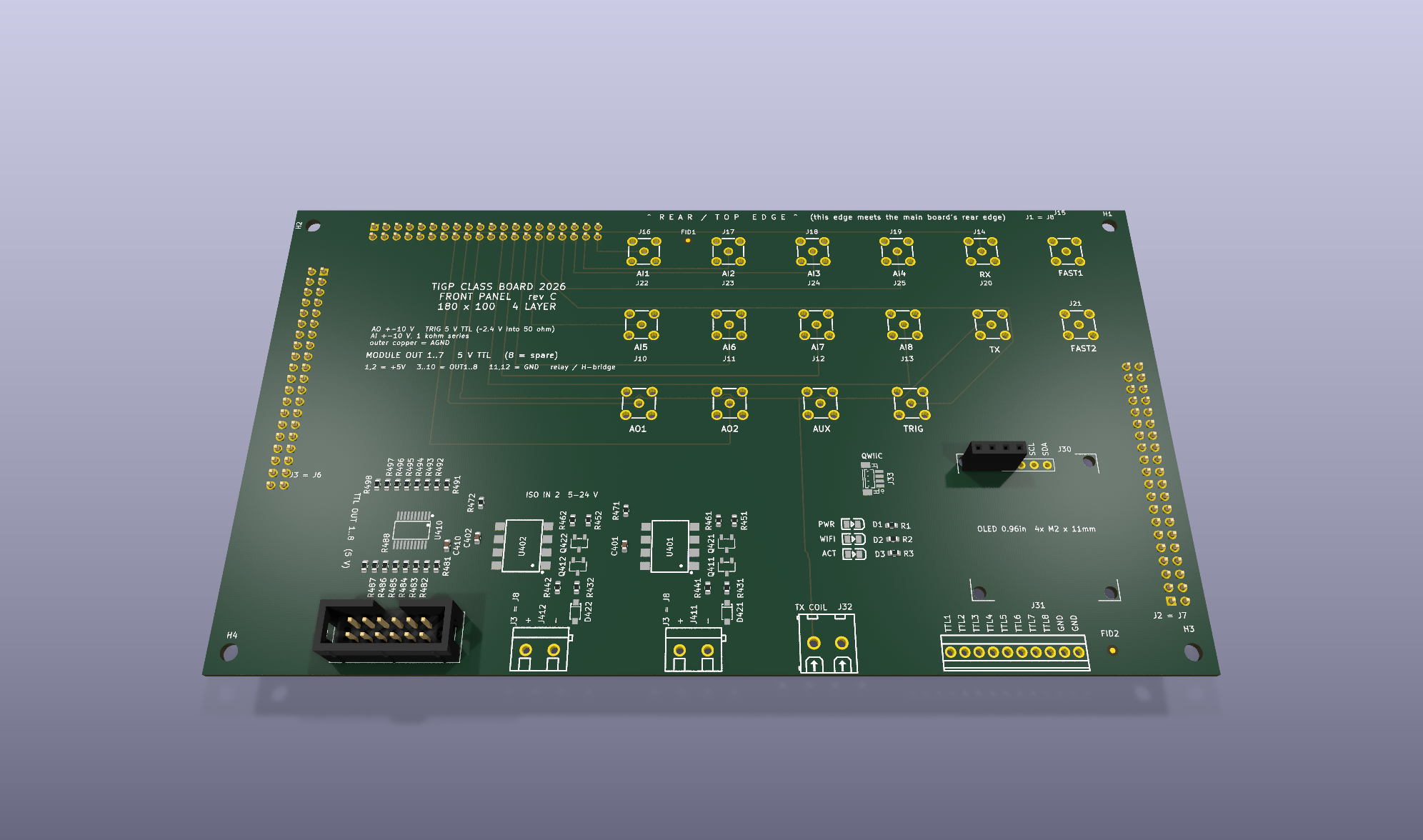
The front panel is the face of the instrument and the board every signal leaves through. It is routed by four students, divided by nets rather than by area, because every panel net runs from a link header at the edge to a connector in the middle — a geometric cut would leave half a trace on every boundary.
Section A is the analog group: the eight analog inputs, the two analog outputs, the auxiliary
line, and the two that matter most — the receiver input RX and the transmit line
TX that drives the coil.
Nets routed
13
Link header J1 out to the SMA field and the TX coil terminal
Board
4-layer
180 × 100 mm; two inner layers are unbroken AGND and GND planes
Tank impedance
14.2 kΩ
What the amplifier actually sees at Q = 10 — not the coil's 6.7 Ω
The board
What I worked out
The design question for this section is not which amplifier has the lowest noise on its datasheet. It is what the source impedance is, and therefore which noise specification you should be reading.
| Quantity | Value | Where it comes from |
|---|---|---|
| Resonating capacitor | 1.25 nF | 2.53 mH coil at 89.4 kHz |
| Parallel resistance | 14.2 kΩ | at loaded Q = 10 |
| Tank Johnson noise | 15.3 nV/√Hz | √(4kTR) — the floor no amplifier beats |
| OPA1656 penalty | 0.15 dB | 6 fA/√Hz current noise |
| OPA1612 penalty | 5.4 dB | 1.7 pA/√Hz × 14.2 kΩ = 24 nV/√Hz |
The OPA1612 has less than half the voltage noise of the OPA1656 — 1.1 nV against 2.9 nV — and
looks like the better part. On this tank it is 5.3 dB worse. The clean way to
see why is the crossover impedance e_n / i_n, the source resistance at which an
amplifier's two noises contribute equally: 483 kΩ for the OPA1656, 647 Ω for the
OPA1612. Our tank sits at 14.2 kΩ — below one, above the other. Same coil, opposite
sides of the line.
Why blank the receiver between the stages, not at its input?
The blanking switch dumps about 60 pC of charge every time it changes state. On the tank (1.25 nF) that is a 48 mV kick; on the 10 nF coupling capacitor between the stages it is 6 mV — and that point is already after the first stage's gain of 101, so referred to the input it is about 59 µV, some 800 times smaller. Worse, a kick into the tank does not just settle: the tank rings at 89.4 kHz, exactly the signal's frequency, with τ = 2Q/ω0 ≈ 36 µs, and no filter can tell that ringing from the signal. A switch across the tank would also load and detune it on every shot.
Why is the interstage high-pass at 1.6 kHz, not 1.6 Hz?
Because a coupling corner is also a recovery time. The transmit pulse drives the first stage into its rails and charges the coupling capacitor, and the receiver is blind until it discharges, with τ = 1/(2πfc). At 1.6 kHz that is 100 µs — about 0.1 % of a 75 ms free induction decay. At 1.6 Hz it is 100 ms, longer than the whole signal: the amplifier would come back after the decay had already gone, and the board would look broken rather than mistuned. The higher corner costs nothing, because the signal sits at the 5.4 kHz intermediate frequency, well above it.
The housing
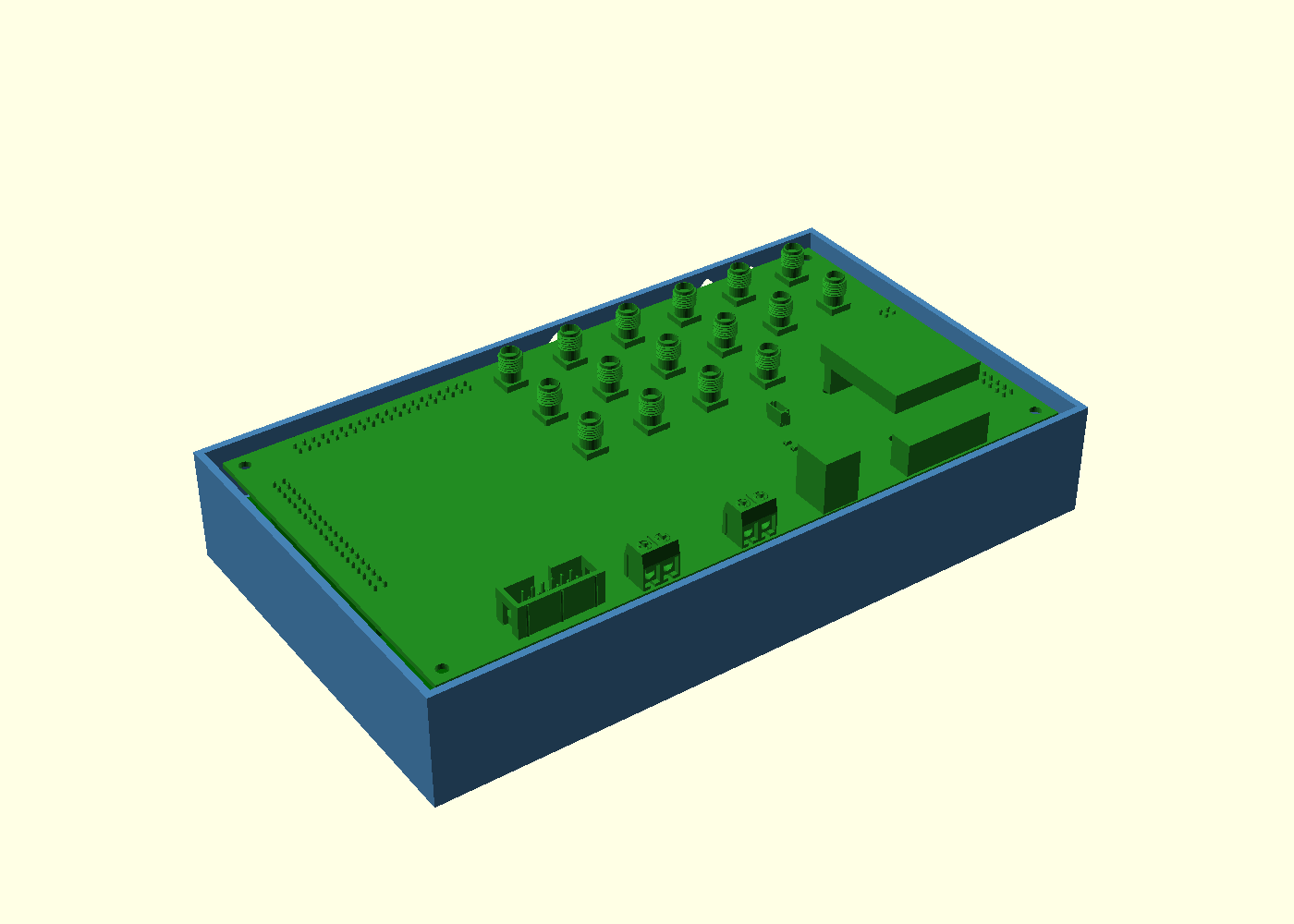
The two boards sit 11 mm apart, joined by three 2×20 pin headers: the panel is the face, the main board is under it, and the dev board hangs 17 mm below that. The housing is written in OpenSCAD, and every dimension came from the board meshes, not from a ruler — the numbers below are measurements, not estimates.
Version 2: fewer holes
The first housing had too many holes, so I rebuilt it from my own specification, written by answering one question at a time — SPEC.md has every decision and the reason for it. What changed:
- No vents. Version 1 had 24 slots in three walls; now the walls are clean. What gets warm inside — the 3.3 V regulator, the isolated supplies, the NMR power amplifier during a pulse — leaves the box somewhat above room temperature, nowhere near the 60 °C at which PLA softens.
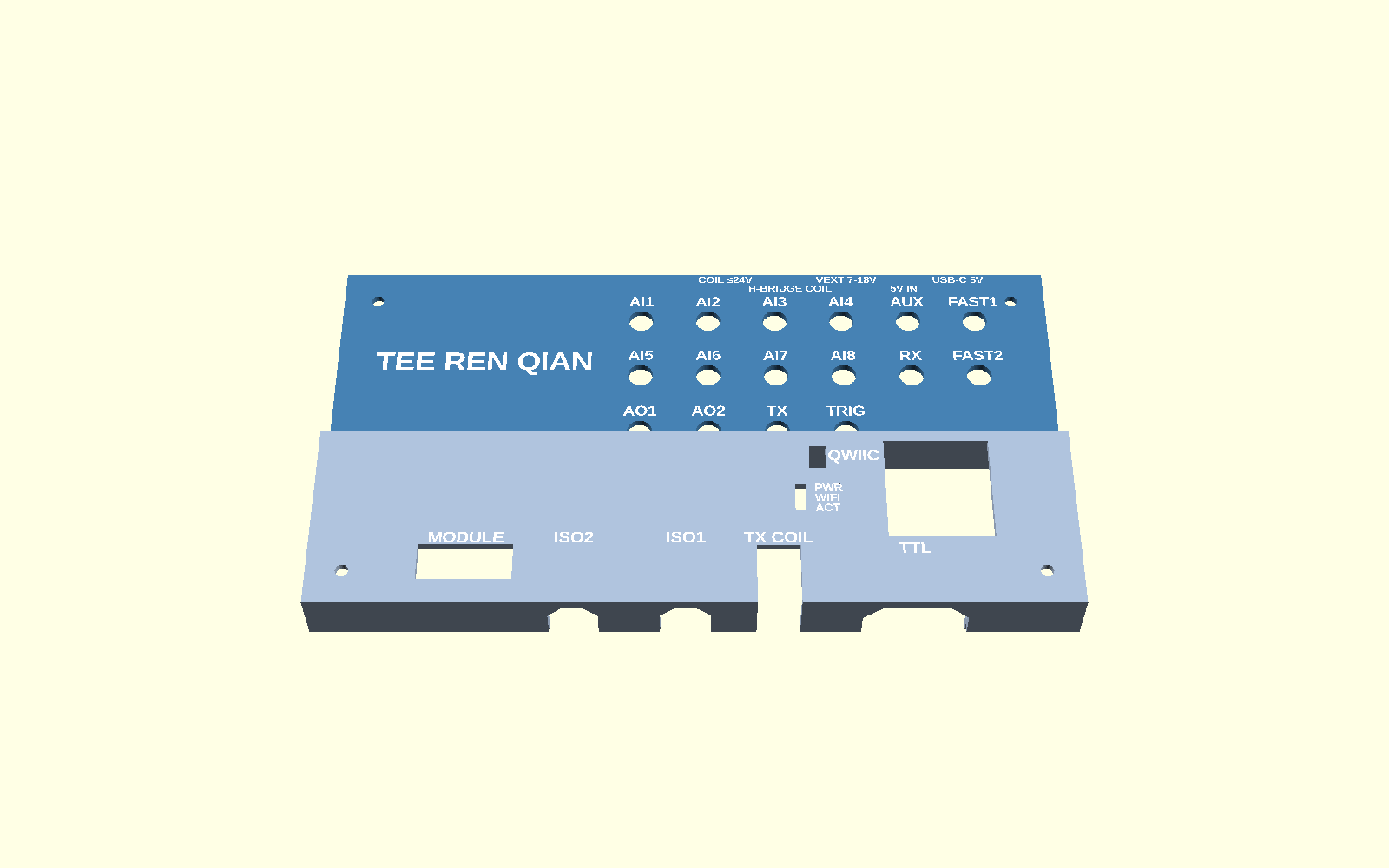
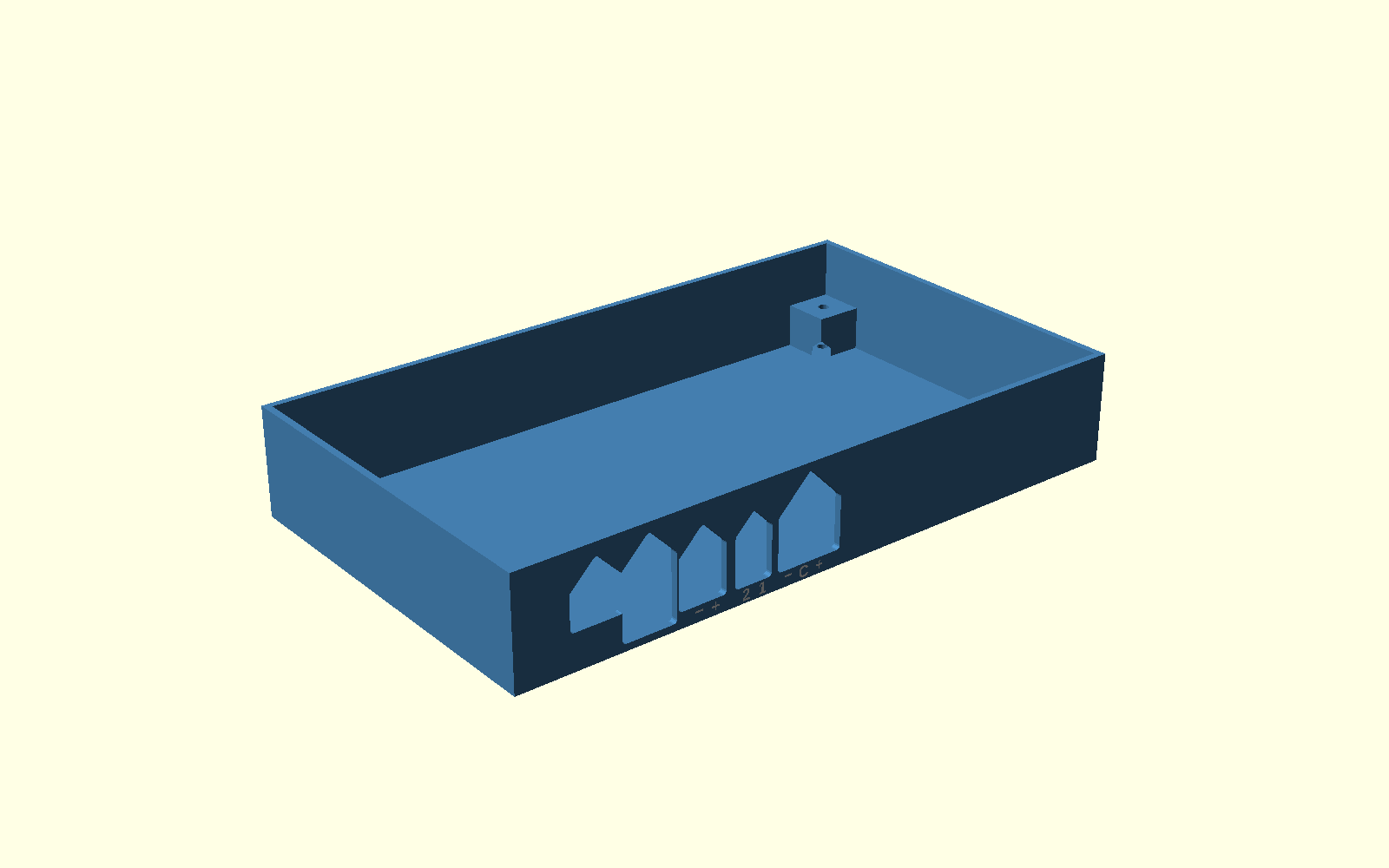
- The names are white. Engraved 0.6 mm and filled with a second-colour inlay, so they can be read across a bench.
- The back is labelled. Each rear connector's name runs along the cover's rear
edge, and each terminal's poles are marked in the rear wall under its wire entries:
J901
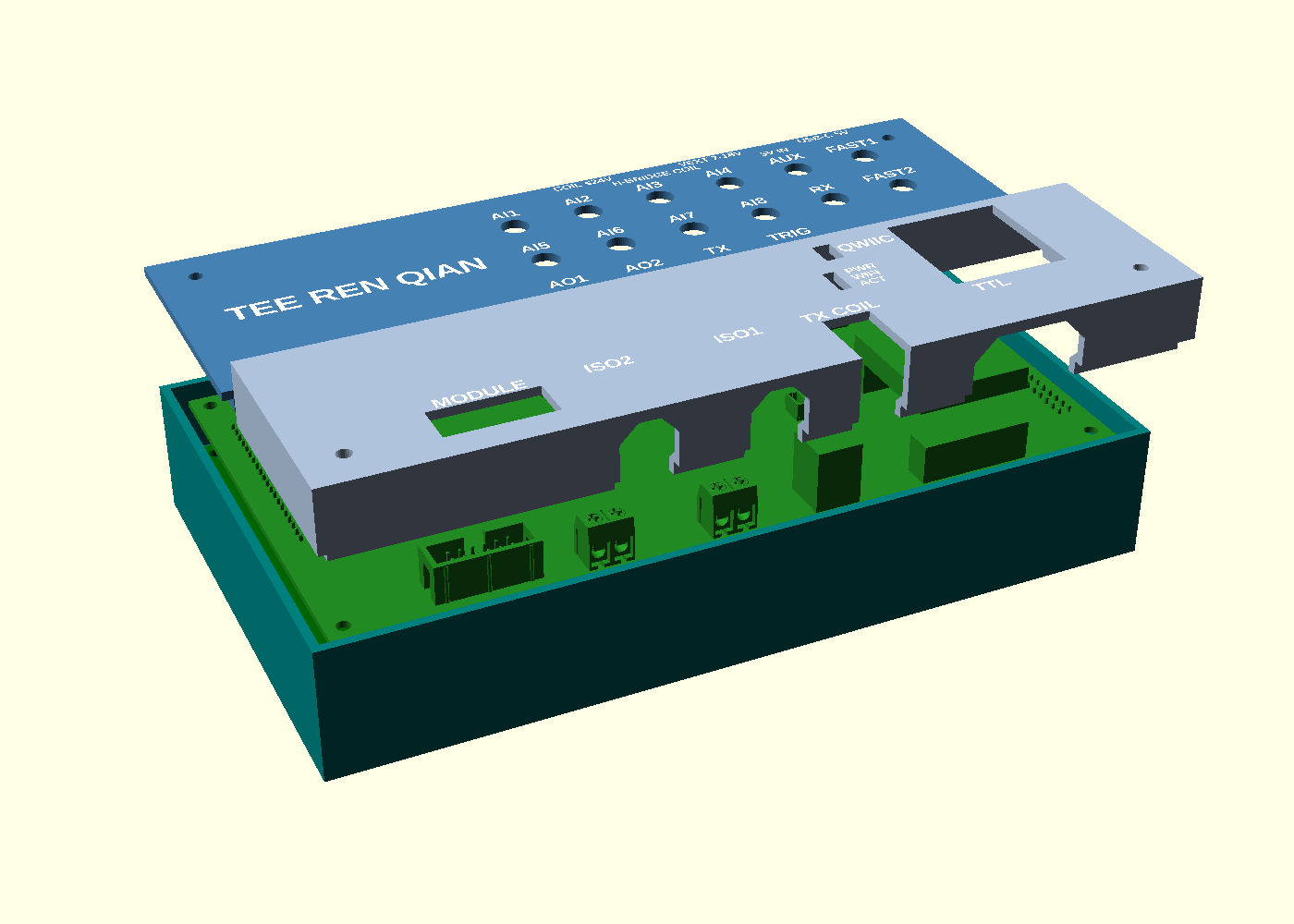
+ −, J9031 2— an H-bridge output has no fixed polarity, so+ −would be wrong — and J905+ C −. All of it was read from the board file's pad nets and silkscreen. - The cover is two parts. Its two flat tops are 12.3 mm apart and only one can lie on the bed: printed in one piece, 10 658 mm² of deck hung 12.3 mm in mid-air. Split where the height already changes, each half prints face down with no supports and keeps two of the four screws.
The problem the cover has to solve
A cover that rests flat on the tallest thing does not work here, and the reason is worth stating precisely:
| Part | Height above the panel face |
|---|---|
| TX coil terminal | 14.10 mm |
| OLED module | 13.82 mm |
| SMA jack | 9.8 mm |
A plate sitting on the OLED leaves every SMA thread about 4 mm below the surface, and a plug nut cannot reach a thread it cannot touch. Measuring the panel mesh showed that the OLED and the TX terminal are the only two things taller than the SMA threads, and that both sit at y < −70 while the entire SMA field sits at y > −70. So the cover splits there: a low deck over the jacks, a raised box over the other end. A thread now stands 5.5 mm proud of the low deck.
Making it print without supports
Every wire entry is a slot in a vertical wall, so every one of them has a ceiling — a flat 90° overhang the slicer wants to prop up. Each one is now a 45° gable, and each nut pocket has a 49° roof:
| Opening | Width | Flat ceiling left |
|---|---|---|
| USB-C | 15.0 mm | 0 |
| DC jack | 15.8 mm | 0 |
| Terminals ×3 | 11.3–19.9 mm | 0 |
| Nut pockets ×4 | 5.8 mm | 0 |
The three terminal openings were one 51.5 mm slot with a 31.4 mm bridge across it, because splitting them left ribs of 0.7 and 1.4 mm — under the 2 mm wall rule and certain to snap. At 0.35 mm clearance, which is the brief's own figure for a hole, the ribs come out at 2.00 and 2.70 mm and each opening is then narrow enough for a full gable. Both problems fall out at once. With the nut pockets roofed, the base has no flat ceiling left anywhere; the only thing a slicer would still call an overhang is the 0.6 mm top of each pole-mark groove, and the white part fills those.
Two things the measuring turned up
Reading dimensions off the meshes rather than trusting the drawings found two errors that would otherwise have reached the printer. The published model of the main board carries a stale footprint: two KF301 terminals read 5 mm high, because the fix to that footprint was exported for the panel only. And my own cover was 190 × 106 against a 190 × 110 base — x had been taken from the outer wall face and y from the inner — which the exported outline caught.
The instrument
The board is the shared platform; the instrument is what you make it do. Mine follows from the analog section: a monitor that watches one input and decides when something has gone wrong.
The obvious way to do that is a threshold on the raw voltage, and it does not work. A real analog
input is noisy, so a rule like alarm when AI3 goes above 1.5 V crosses its threshold
dozens of times a second and fires on the first noise peak rather than on the thing you care
about. So the watch block holds one channel over a window and publishes values that
are worth alarming on instead:
| Value | What it catches |
|---|---|
dev | How far the mean has moved from the baseline. Noise averages out of it, so a rule fires when the signal has actually moved. |
drift | Volts per minute. Catches a slow walk long before
dev crosses anything. |
rms | The noise itself — so a rule here watches the instrument's health, not its reading. An intermittent connector shows up here first. |
excursions | Samples past kσ, counted cumulatively, so a burst of spikes that the mean hides still fires once and stays flagged. |
Commands are set_input, set_window, set_sigma,
zero and reset. zero takes the current mean rather
than the current sample, because one noisy sample would put the baseline in the wrong place. The
block reads the ADS8688 through the shared driver rather than calling the inputs block, since a
block never talks to another block directly, and it never waits for the SPI bus — during an NMR
capture the sequencer holds it for the whole burst, and waiting there would stall everything else.
The phone panel offers the alarm as a chooser — pick the value, the operator and the threshold — rather than as a fixed button, because which of those four matters depends entirely on what is plugged into the input.
A two-channel scope on the phone
The B1 tab is an oscilloscope as well as a voltmeter. The voltmeter reads all eight inputs twenty times a second, which is fine for a slow drift but useless for anything in the kilohertz range: a 1 kHz sine read twenty times a second just looks like random numbers. So for fast signals the board samples one or two inputs at up to 250 kS/s and sends the raw samples to the phone as binary frames on the same WebSocket. The phone does all the drawing, measuring and the FFT, which keeps the firmware small and leaves the board free to sample.
Roll streams continuously, like a chart recorder. Auto, Normal and Single take triggered snapshots, so a repeating waveform stands still on the screen: Auto still shows something when the trigger never fires, Normal waits for it, and Single takes one capture and stops. The second input is sampled in the same ADC scan as the first, so the phase between the two traces is real. Here AI6 is AI3 after a 1 kHz RC low-pass, and the panel reads the 45° lag directly. The spectrum view turns the same samples into a frequency plot, and that is where small things show up: the 60 Hz line sits 40 dB below the 1 kHz signal and cannot be seen on the waveform at all.
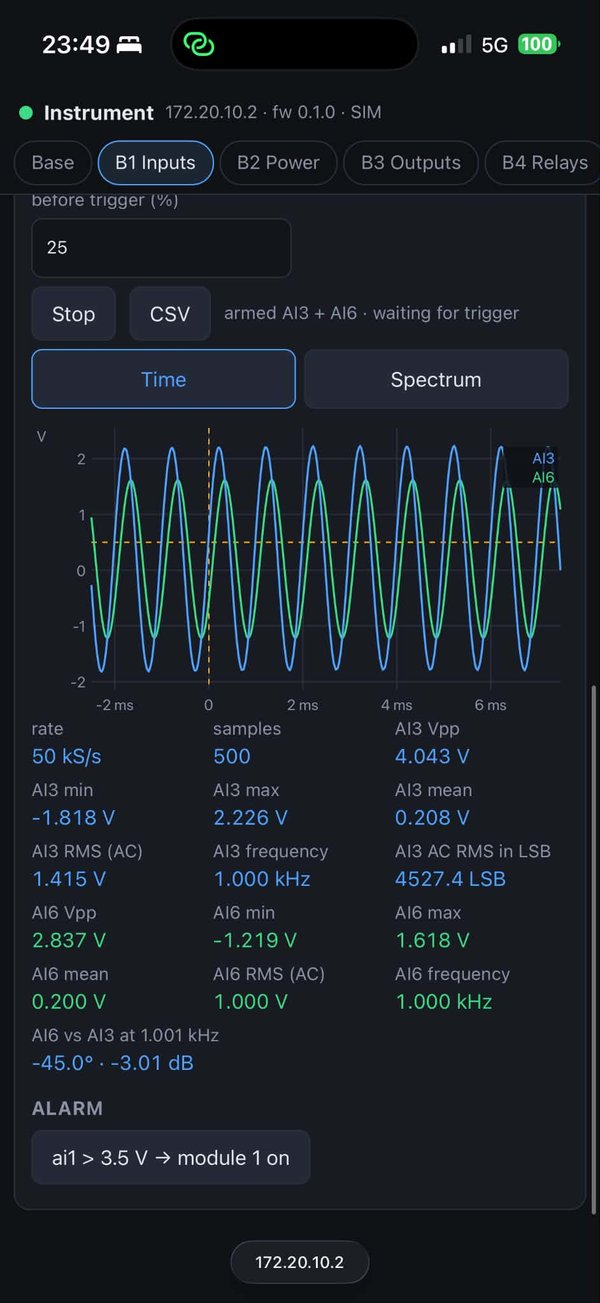
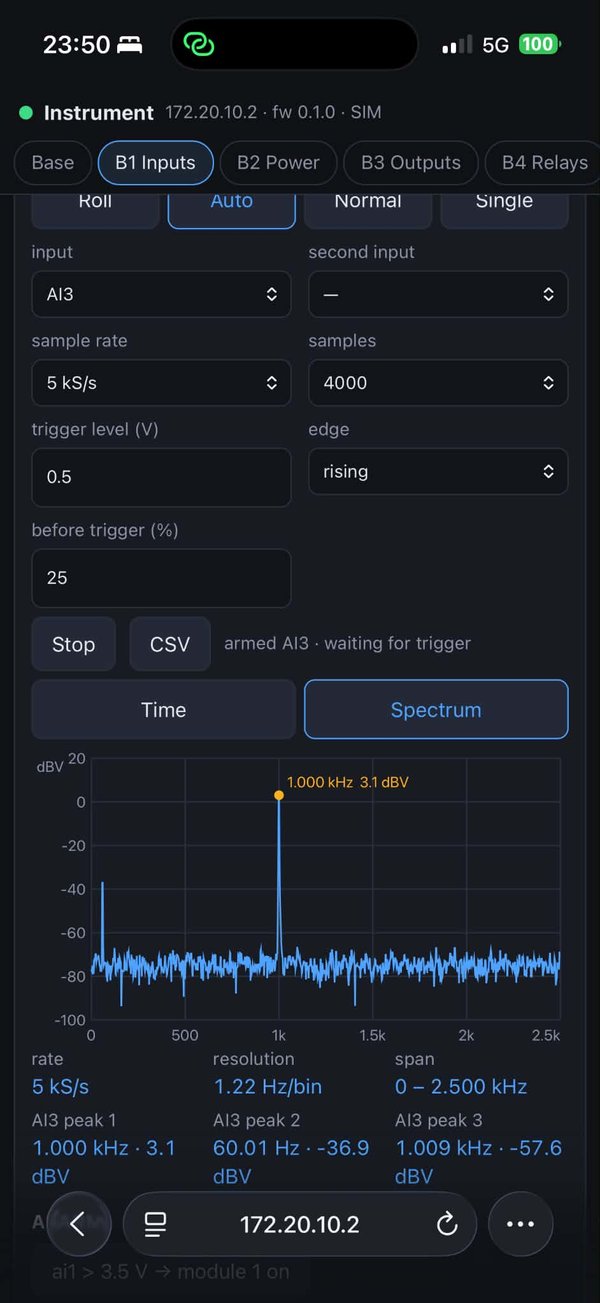
Measured on the dev board running the simulation build (the inputs are simulated until the class board arrives):
| Quantity | Expected | Measured |
|---|---|---|
| AI6 relative to AI3 at 1 kHz (an RC low-pass at its corner) | −45° · −3.01 dB | −45.0° · −3.01 dB |
| AI3 frequency | 1.000 kHz | 1.000 kHz |
| AI3, a sine of 2 V amplitude | +3.0 dBV | +3.1 dBV |
| The 60 Hz line, 20 mV amplitude | −37.0 dBV | −36.9 dBV |
| AI6 peak to peak, 2/√2 V amplitude | 2.83 V | 2.837 V |
Every number lands on the textbook value. An RC low-pass at its corner frequency passes a signal at 1/√2 of its amplitude (−3.01 dB) and 45° late, and a sine of amplitude A has an rms value of A/√2, which for 2 V is +3.0 dBV. The inputs are still simulated, so this checks the software chain (sampling, framing, the phone's arithmetic) and not the analog front end.
Talking to it from Telegram
The instrument also has a Telegram bot. From anywhere, I can ask it for its readings, switch a module output, change its LED, or set an alarm that messages me when an input crosses a threshold. This works from a phone hotspot because the board never waits for incoming connections. It keeps asking Telegram's servers for new messages (long polling) and sends its replies the same way, so all it needs is a way out to the internet: no server of my own and no public address. That is also why I used Telegram rather than LINE, which can only deliver messages to a public web address.
Anyone can find a bot, so the board obeys one chat only. The instrument's page shows a six-digit
code, and only the chat that sends /start with that code is paired; five wrong
guesses change the code. Messages sent while the board was switched off are skipped rather than
carried out, so an old /module 1 on cannot switch anything hours later.
The surprise was getting onto the iPhone hotspot at all. An iPhone's hotspot is named after the
phone, Tee’s iPhone, and iOS writes that apostrophe as a curly ’ (U+2019).
I had typed a straight ', so the board never matched the name and silently fell back
to its own network. Once the firmware printed the networks it could see, the difference showed up
at once. Every iPhone in the class will hit the same problem.
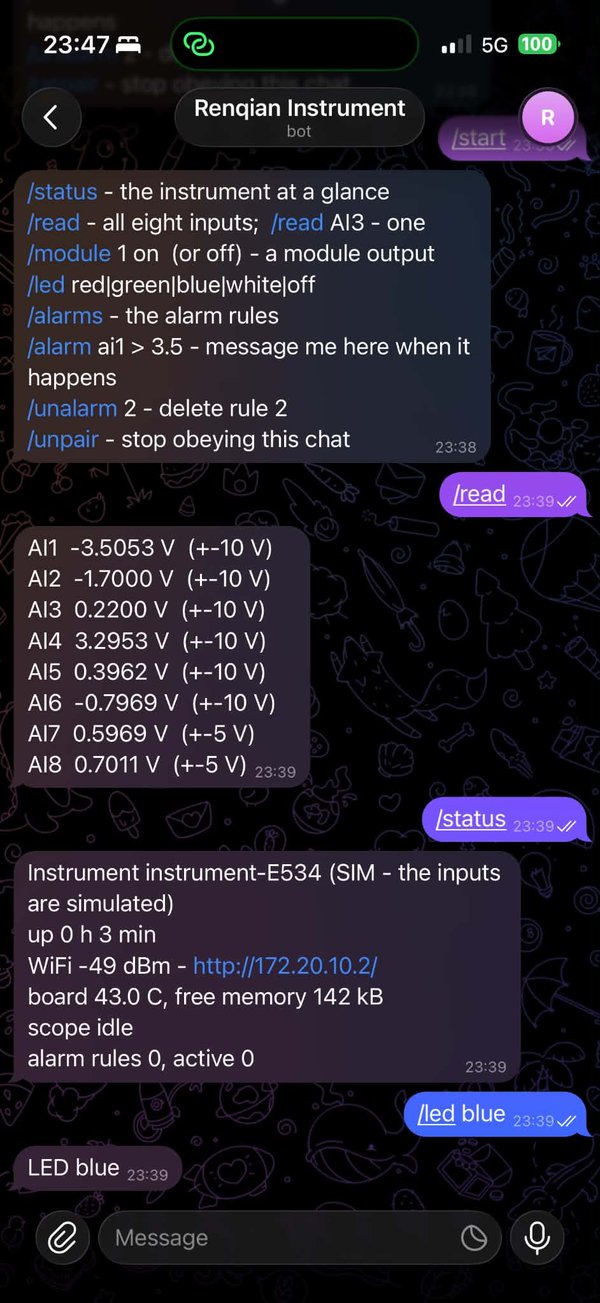
/read, /status and
/led blue.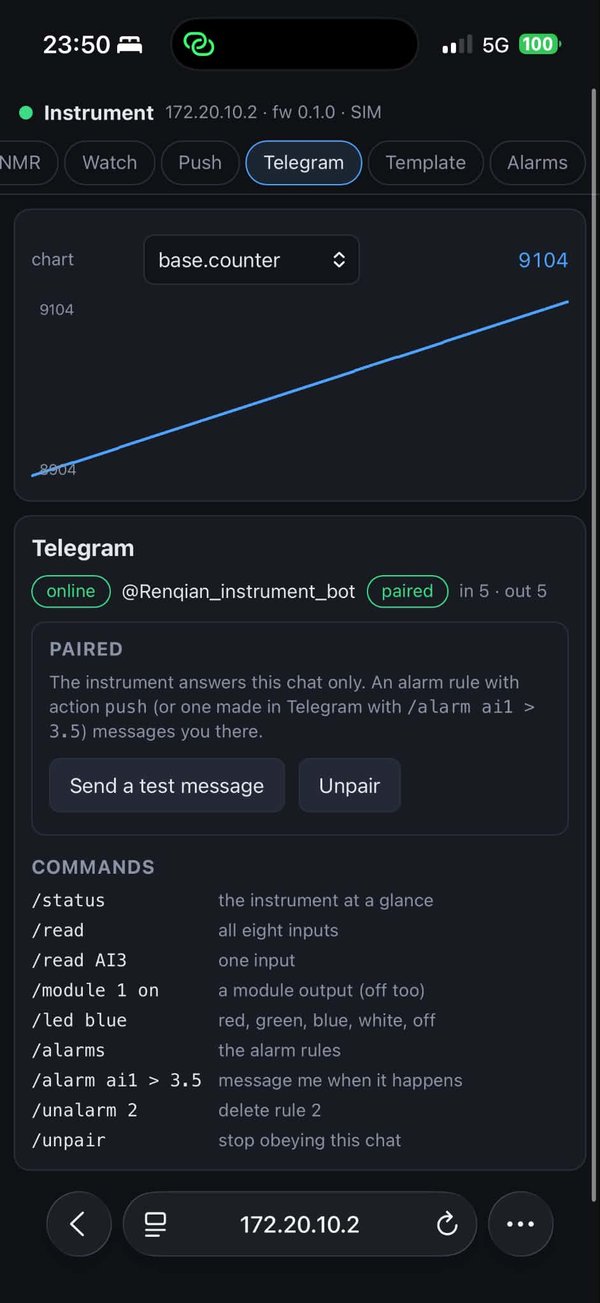
| Send | The instrument |
|---|---|
/status | uptime, WiFi, its address, board temperature, scope state, alarm rules |
/read · /read AI3 | all eight inputs, or one, with their ranges |
/module 1 on | switches a module output (off too) |
/led blue | the RGB LED: red, green, blue, white, off |
/alarm ai1 > 3.5 | adds an alarm rule that messages this chat when it fires |
/alarms · /unalarm 2 · /unpair | lists the rules, deletes one, forgets the chat |
Download and print it
Everything printable, as it stands. Print the coupon first — it is small, and which of its seven holes takes an M3 is the number that decides every hole in the other parts. Its nut pocket is a corner cut out of the base itself, and its names are the cover's own 2.2 mm names, printed face down in white the same way. Until it comes out, the hole sizes here are assumptions.
| File | What | How to print it |
|---|---|---|
| coupon.3mf, or coupon.stl + coupon-labels.stl |
Fit test — M3 holes 3.0–3.6 mm, SMA holes 6.6–7.0 mm, a corner of the base with its nut pocket, the cover's names at 2.0, 2.2 and 2.6 mm | 78 × 39 × 10 mm, names face down, about 40 min. The 3mf is already set up for two colours and Arachne. Do this one first. |
| base.stl + base-labels.stl |
The tray: four M3 bosses, four openings for five connectors, the pole marks | 190 × 110 × 31 mm, flat on its back, no supports |
| cover-low.stl + cover-low-labels.stl |
The low deck over the SMA field: the 16 jack names, the rear connectors' names, my name | 190 × 60 × 5 mm, already face down, no supports |
| cover-high.stl + cover-high-labels.stl |
The raised box over the OLED and the TX terminal | 190 × 50 × 17 mm, already face down, no supports |
| coil-former.stl | Receive coil former, 546 turns of 0.4 mm wire in the window | Plain PLA or PETG — never carbon-filled, it conducts |
| cover.dxf | Flat outline of the cover | Reference only — see the note below |
Two colours. Load each body together with its -labels file and answer
Yes to load as a single object with multiple parts; give the labels part white and the
body a dark colour. On the covers the names are the first three layers, so the AMS changes colour
only a few times; the base's pole marks are on an upright wall and span about 16 layers. All the
white together is under half a gram. With no AMS, print the bodies alone — every name is
still there, engraved.
Set the wall generator to Arachne (Quality tab) for the covers and the coupon. The A1 profile starts on Classic, and sliced that way the 2.2 mm names got white on under 16 % of their letters in the first layer — the face you read — because their 0.44 mm strokes are narrower than the 0.5 mm first-layer line. With Arachne it is 95–97 %. coupon.3mf already has it set.
Source: housing.scad is the entry point and takes
PART = base, base_labels, cover_low,
cover_high, cover_low_labels, cover_high_labels,
coupon, coupon_labels or cover2d; it needs the five files beside it
(params,
shapes,
base,
cover,
coupon) and
BOSL2. The coil former is
coil-former.scad, which prints its own winding
recipe and the inductance that window should give.
You will need two screw lengths, not one. The near pair's heads land on the low deck and the far pair's on the raised deck, 12.3 mm higher: M3 × 30 ×2 and M3 × 45 ×2, plus the brief's M3 × 11 stand-offs and four M3 nuts.
About the DXF: the cover is a printed part with two heights and a flat projection cannot carry
that. Three of its four far-wall notches do not appear in the outline at all, because the raised
deck above them fills their shadow. There is no $INSUNITS in it either, so anything
reading it has to be told these are millimetres. It is there for reference, not for cutting.